

Rostering breaks quietly. Nobody notices in August when enrollment is clean and everyone's logins work. The cracks show up in late October — a new teacher gets assigned to a section she can't see, or 14 kids in a bilingual cohort suddenly can't launch their benchmark because their SIS grade level flipped from "08" to "8" after a mid-year data cleanup. By the time the help desk tickets pile up, the assessment window is already open and the clock is running.
Most districts treat rostering as an IT task instead of an operational system. It's not a sync button. It's a chain that runs from your SIS, through OneRoster or Clever, into a dozen vendor platforms, SSO providers, and assessment engines — and every link in that chain has its own assumptions about what a "valid" student record looks like. When those assumptions don't match, you don't get an error message. You get a kid staring at a blank screen during a timed test.
This playbook is about the master-data discipline underneath all of that: how to map fields so they survive handoffs, how to catch bad data before it propagates, and how to tie reconciliation to your assessment calendar so integrity holds when it actually counts.
Why rostering breaks across almost every district
The root problem is that your SIS is the source of truth for enrollment, but it was never designed to be the source of truth for identity across third-party systems. A student is one human being, but in practice they exist as:
-
A state ID in your SIS
-
An SIS internal record number
-
A OneRoster
sourcedId -
A Clever
id -
A Google or Microsoft SSO identity
-
One or more vendor-side user records
Each of these has to agree about who the student is, what grade they're in, which teacher they belong to, and which section they sit in. When any one of those drifts, the sync technically "succeeds" while quietly pointing a kid at the wrong class.
The failure almost never comes from the rostering vendor. It comes from inconsistent data entry upstream — a registrar in one building formats names "Last, First," another uses "First Last," a third leaves a trailing space. OneRoster passes all of it faithfully. Garbage in, garbage synced.
Field mapping: where the real damage happens
Most rostering problems trace back to three or four fields that get mapped sloppily. Here's a breakdown of the fields that cause the most downstream pain and how they tend to break.
Keep every student on track with ease.
Skolyly helps you create, assign, and monitor classroom activities efficiently.
- Integrated lesson and assignment management
- Real-time student progress tracking
- Automated class scheduling & notifications
No credit card required
| Field | OneRoster | Clever | Common failure |
|---|---|---|---|
| Student identifier | sourcedId / metadata.stateId | sisid / studentnumber | Vendor keys on the wrong ID, orphaning records after a re-enrollment |
| Grade level | grades (e.g., "08") | grade (e.g., "8") | Zero-padding mismatch excludes kids from grade-banded assessments |
| Section/class | classSourcedId | section_id | Section renumbered mid-year, breaking teacher-to-roster links |
| Teacher-of-record | users + enrollments role=teacher | teachers array | Co-teachers mapped as primary, scrambling data ownership |
| Email/username | email / username | email | Format drift breaks SSO match and creates duplicate accounts |
| Enrollment status | status active/tobedeleted | enrollment present/absent | Withdrawn students stay active in vendor until next full sync |
Use the state ID as your single join key across every integration whenever possible.
The single most important decision you make is which identifier is your join key, and it has to be the same across every integration. The state ID is usually the safest because it's stable across re-enrollments and school transfers within the district. Internal SIS record numbers are dangerous as join keys because they can regenerate when a student is withdrawn and re-added — which happens constantly with mobile populations.
Grade-level formatting deserves its own callout. The difference between "08" and "8" is invisible to a human and fatal to a filter. If your assessment platform pulls "all grade 8 students" and your SIS exports "8" while OneRoster normalizes to "08," you can lose an entire grade band from a benchmark roster and not realize it until scores come back short.
For email and username, pick a deterministic format and enforce it at the source. If usernames are generated by concatenating name fields, every registrar inconsistency becomes an SSO failure. A student named "D'Angelo" with an apostrophe handled three different ways across three systems is three accounts that don't match.
If you're still standing up the governance around who owns these mapping decisions, it's worth pairing this with your broader district edtech governance pipeline so interoperability requirements get written into procurement instead of discovered after go-live.
Nightly reconciliation rules that actually catch problems
A sync that runs is not a sync that's correct. Reconciliation is the step most districts skip — they assume that if the job didn't throw an error, the data is fine. It isn't. Reconciliation means comparing what should be true against what is true across systems, every night, before anyone logs in.
Here's a practical nightly reconciliation sequence:
-
Pull a fresh enrollment snapshot from the SIS and timestamp it. This is your reference truth for the night.
-
Compare active student counts per school and per grade against the previous night. A swing of more than a few percent in a single building, outside of known enrollment events, is a flag — not a fact, but a flag worth a human glance.
-
Reconcile section rosters by matching SIS section membership to vendor-side membership. Any section where the counts differ gets listed.
-
Check teacher-of-record integrity — every active section should have exactly one primary teacher. Zero or two is an anomaly.
-
Verify orphans in both directions students in a vendor with no matching SIS enrollment (ghost accounts), and SIS-active students missing from the vendor (locked-out kids).
-
Validate SSO identity match rates — the percentage of rostered students whose SSO identity resolves cleanly. A drop here predicts a login crisis the next morning.
-
Log everything with a run ID so you can diff tonight against last night and see exactly what moved.
The reason to run this nightly rather than weekly is that errors compound. A single bad section mapping on Monday becomes a bad assessment roster by Thursday, and by then the scores are already contaminated. Nightly reconciliation keeps your error window to roughly 24 hours instead of a full grading period.
The mistake districts make here is logging reconciliation output to a file nobody reads. A nightly job that detects 40 anomalies and emails them into a shared inbox has solved nothing. Detection only matters if it routes to a person with the authority and the time to fix it before first bell.
Anomaly alerts: what's worth waking someone up for
Not every discrepancy is an emergency. Part of good master-data discipline is distinguishing noise from signal so your rostering lead doesn't get numb to alerts. The anomaly patterns worth building explicit alerts around, roughly in order of severity:
-
Mass enrollment drop more than around 5% of a school's active students disappear from a vendor overnight. This almost always means a failed sync or a bad SIS export, not 200 kids actually leaving.
-
Grade-band wipeout an entire grade's roster count hits zero in an assessment platform. Classic grade-format mismatch — catastrophic during a benchmark window.
-
Teacher-of-record gaps active sections with no primary teacher assigned. These kids can't be seen, assigned, or scored by anyone.
-
Duplicate identity spike a jump in new accounts that match existing students on name but not on ID. Usually a username-format change or a re-enrollment that generated a fresh key.
-
SSO match-rate drop cleanly resolving identities fall below your baseline — early warning for a morning of lockouts.
-
Status lag withdrawn students still showing active in a vendor more than one sync cycle after withdrawal. A privacy and seat-licensing issue as much as a rostering one.
A typical scenario looks something like this: a mid-sized district runs its nightly sync, and the reconciliation job flags that 8th-grade math sections in two middle schools dropped from around 480 students to zero in the benchmark platform. Alert fires at 2:40 a.m. The on-call rostering lead sees it at 6 a.m., traces it to a grade-field normalization change pushed the previous afternoon, corrects the mapping, and re-runs before 7:15. Nobody in those buildings ever knew there was a problem. Without the alert, the first signal would've been teachers reporting empty rosters as kids sat down to test.
That's the whole point of anomaly alerting: convert a silent failure into a 45-minute fix that happens before anyone's affected.
Tying reconciliation to assessment windows
Your rostering system shouldn't behave the same way in a quiet week as it does the morning a state benchmark opens. This is where most districts under-invest — they run one reconciliation cadence year-round and get surprised every testing season.
During an open assessment window, the rules tighten:
-
Freeze non-urgent roster changes. Enrollment moves still happen, but bulk re-mappings, section renumbering, and username reformatting get locked until the window closes. Most contamination comes from well-intentioned mid-window "cleanups."
-
Shorten the sync cycle. If you normally sync nightly, consider an additional midday reconciliation pass during the window so a morning enrollment change doesn't strand a kid for the afternoon session.
-
Pre-window roster certification. Before the window opens, building leads sign off on their section rosters against the assessment platform. This catches mismatches while there's still time to fix them, not during.
-
Raise alert sensitivity. Thresholds that are fine in October — a 5% swing — get tightened during a window because the cost of a missed anomaly is now a contaminated score set.
PRE-WINDOW WORKFLOW (2 weeks out → window open → window close) [SIS Snapshot] → [Full Reconciliation Run] → [Certification Roster per Building] ↓ [Building Leads Confirm Rosters] → [Discrepancies Resolved] ↓ [Window Opens] → [Freeze Structural Changes] + [Add Midday Sync Pass] + [Tighten Alert Thresholds] ↓ [Window Closes] → [Post-Window Reconciliation] → [Score Cohort Confirmation] → [Document & Unfreeze]
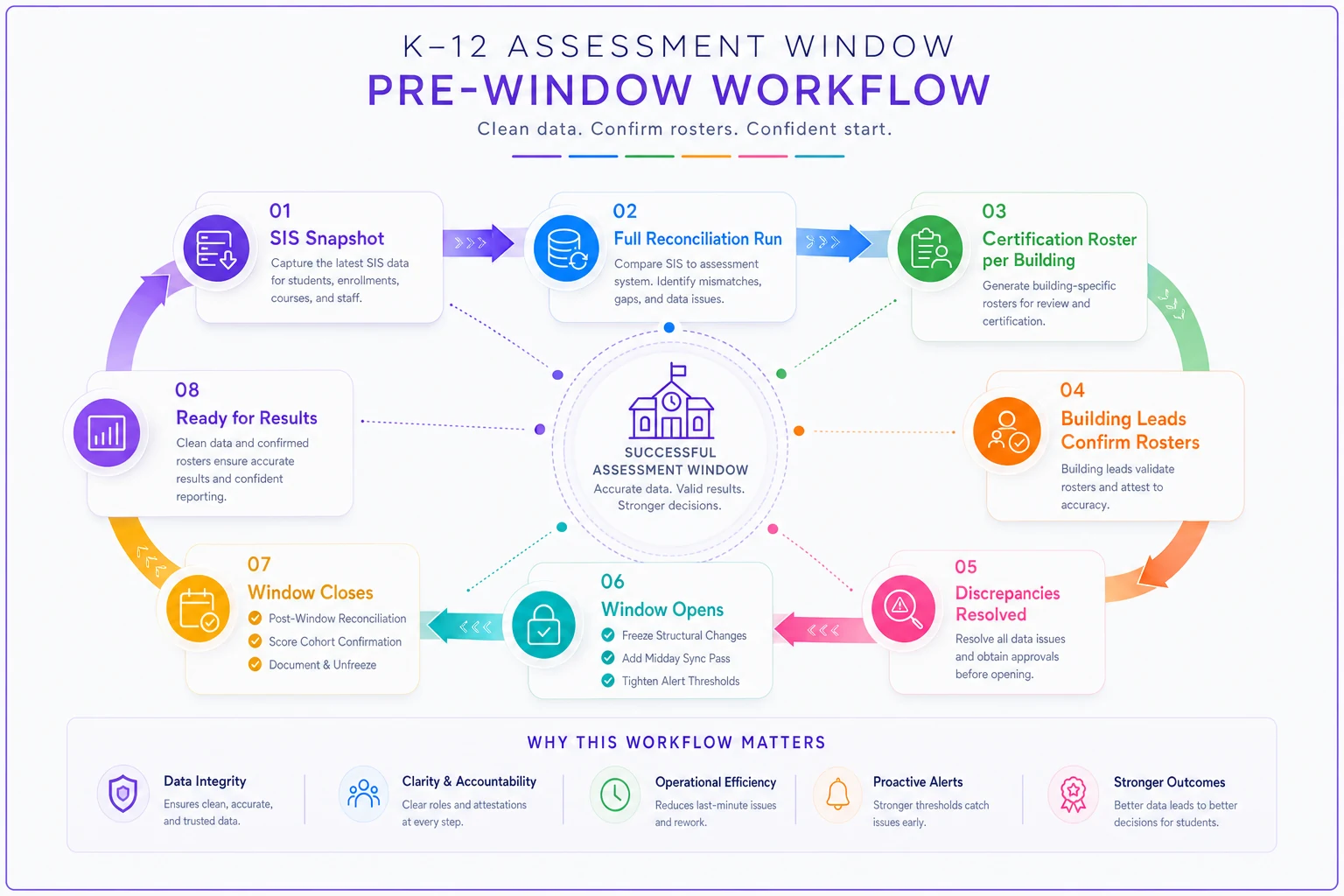
The workflow in practice: two weeks before a window, you run a full reconciliation and generate a certification roster per building. Building leads confirm their rosters match what they expect — right kids, right sections, right teachers. Discrepancies get resolved during this pre-window period while the stakes are low. When the window opens, structural changes are frozen, the midday pass kicks in, and alerts tighten. When it closes, you unfreeze, run a post-window reconciliation to confirm scores mapped to the correct cohorts, and document anything that moved.
This is really an extension of calendar governance. Your assessment windows should already be defined and protected, and rostering reconciliation becomes one more thing that keys off those dates. If your assessment program lifecycle already has version-control gates and tagging conventions, tying roster certification to those same windows is a natural fit.
Monitoring dashboards that protect integrity
Reconciliation runs in the dark. A dashboard brings it into the light so someone can glance at it with coffee and know whether the district is healthy before the day starts.
A rostering health dashboard worth maintaining tracks a small number of things that actually predict problems:
-
Overall identity match rate across SIS, OneRoster/Clever, and SSO — one number, trended daily
-
Per-building roster parity — are section counts in the vendor matching the SIS, building by building
-
Teacher-of-record completeness — percentage of active sections with exactly one primary teacher
-
Orphan counts in both directions — ghost accounts and locked-out students
-
Open anomalies by age — how many flags are outstanding and how long they've been sitting
-
Sync freshness — when did the last successful reconciliation complete, per integration
The dashboard's job isn't to show everything. It's to answer one question fast: is it safe to open assessments today? If match rate is at baseline, parity is green across buildings, teacher-of-record is complete, and there are no aging anomalies, the answer is yes. If any of those is off, the answer is fix it first.
Where lightweight monitoring platforms earn their keep is in automating the nightly reconciliation diff and routing anomalies to the right person instead of a dead inbox — turning the whole chain from a thing someone remembers to check into a thing that surfaces itself. The dashboard is only as good as the field mapping and reconciliation rules underneath it, though. A pretty dashboard sitting on top of a bad join key just displays wrong numbers confidently.
When tight reconciliation makes sense — and when it's overkill
Not every district needs a midday sync and pre-window certification. Matching the rigor to the stakes matters.
This makes sense when:
-
You run high-stakes benchmark or state assessments through rostered platforms
-
You have meaningful student mobility and frequent mid-year enrollment changes
-
You integrate with several vendors that each key on identity differently
-
Score integrity has consequences — accountability, placement, intervention decisions
This is probably overkill when:
-
You're a small single-building program with stable enrollment and one or two platforms
-
Assessments aren't tied to rostering at all — paper-based or standalone
-
Your mobility is low enough that a nightly sync rarely drifts within a day
Who should not attempt this without groundwork: any district that hasn't settled on a single stable join key across systems. If your identifiers don't agree yet, building reconciliation on top of them just automates the confusion. Fix the identity foundation first, then layer on reconciliation and alerting.
A short real scenario
A regional district of around 9,000 students across a dozen buildings kept hitting the same failure every testing season: benchmark day would open and a cluster of students — usually newly enrolled or recently moved — couldn't launch their assessment. Help desk would log 60 to 90 tickets in the first two hours of each window, and proctors burned instructional time rerouting kids.
The underlying issue wasn't the rostering vendor. The district synced nightly, never reconciled, and used an internal SIS record number as the join key — which regenerated every time a mobile student re-enrolled. Re-enrolled kids got fresh keys, orphaned their vendor accounts, and showed up as locked-out ghosts on test day.
They switched the join key to the stable state ID, added a nightly reconciliation pass with orphan detection, and introduced pre-window roster certification by building leads. The next benchmark window opened with single-digit login tickets instead of dozens, and the ones that came in were resolved before most sessions started. Nothing about the assessment changed — they just stopped letting bad identity data reach test day.
Closing thought
Rostering isn't a once-a-year setup task. It's a living data chain that drifts a little every day and falls apart loudly at exactly the wrong moment. The districts that keep assessment integrity intact aren't the ones with the fanciest tools — they're the ones who picked a stable join key, mapped their fields deliberately, reconciled every night, and tightened the whole system around their assessment calendar.
Get the identity foundation right and most of the chaos disappears. Because this chain also moves a lot of sensitive student data between systems, it's worth making sure your reconciliation and vendor practices line up with your student data privacy playbook — clean rostering and clean data handling are the same discipline viewed from two angles.
Get the identity foundation right and most of the chaos disappears. Because this chain also moves a lot of sensitive student data between systems, it's worth making sure your reconciliation and vendor practices line up with your student data privacy playbook — clean rostering and clean data handling are the same discipline viewed from two angles.
Ready to elevate your classroom management?
Join 5,000+ educators using Skolyly to save time, engage students, and improve learning outcomes.