


Most assessment programs don't fail because someone wrote a bad item. They fail because nobody knows which version of the item is live, which standard it's actually measuring, or whether the passage was quietly swapped out three years ago and never re-tagged. The item is fine. The system around it rotted.
That's the real problem an assessment director inherits: not a single test, but a growing library of items, forms, standards mappings, and historical results that all have to stay coherent while the people, standards, and priorities underneath them keep shifting. A curriculum coordinator retires. The state adjusts a standard's language. A vendor sunsets a platform. Every one of those events puts pressure on the same fragile thing — the connection between an item and everything it's supposed to mean.
So this isn't a "write better questions" article. It's about the machinery that keeps a common-assessment program reliable across years: how you tag, how you maintain, where you put quality gates, and how you version things so that last year's data still means something next year.
Why item banks decay quietly
Item banks don't blow up. They erode. And the erosion is almost always invisible until someone tries to make a decision with the data.
A typical example: a district builds a common assessment bank in year one with clean intentions. Every item is tagged to a standard, difficulty is noted, everyone's excited. By year three, a few teachers have built "improved" versions of items and shared them informally, the standards were revised so roughly 15% of the tags are now technically wrong, and nobody can tell which items were retired versus just forgotten. The bank still runs. It just doesn't mean what people assume it means.
-
Ownership gaps. The person who built the bank leaves, and no one formally takes over the metadata. Items keep getting used; nobody keeps them accurate.
-
Silent edits. A teacher fixes a typo or reworks a distractor mid-year. The item's ID stays the same but the item is now different, so cross-year comparisons quietly break.
-
Tag drift. Standards get renumbered or reworded, and the tags don't follow. Now your "standards report" is measuring a standard that no longer exists in that form.
-
Orphaned forms. A test form references item versions that were later changed. The form still assembles, but it's a mix of old and new.
The common thread: metadata and versioning get treated as clerical afterthoughts instead of the actual product. In an assessment program, the item is the metadata. Strip away accurate tagging and version history and you don't have an item bank — you have a folder of documents.
Tagging conventions: the layer everything else depends on
If you get tagging right, most of the governance work gets easier downstream. If you get it wrong, no amount of QA saves you, because your quality checks will be measuring the wrong dimensions.
Keep every student on track with ease.
Skolyly helps you create, assign, and monitor classroom activities efficiently.
- Integrated lesson and assignment management
- Real-time student progress tracking
- Automated class scheduling & notifications
No credit card required
The mistake most programs make is tagging for retrieval only — "find me a fractions question" — instead of tagging for governance and analysis. A useful tagging scheme has to answer four different questions at once: what does this measure, how hard is it, where did it come from, and what state is it in right now.
A workable tag structure that stays lightweight:
| Tag category | Purpose | Example values |
|---|---|---|
| Standard code | Alignment (the why) | 6.RP.A.3, HS.LS1-2 |
| DOK / cognitive level | Comparability across forms | DOK 1–4 |
| Item type | Form assembly + analysis | MC, CR, technology-enhanced |
| Content owner | Accountability | grade-team, dept, named lead |
| Lifecycle status | Governance | Draft / Review / Live / Retired / Flagged |
| Version ID | Version control | v1, v2, v3 |
| Last-validated date | Maintenance trigger | 2024-08 |
A few things matter more than they look.
Lifecycle status is the tag people skip, and it's the one that saves you. An item is never just "in the bank." It's in a state. A Draft item shouldn't appear on a live form. A Flagged item — one that's shown weird statistics or a possible content error — needs to be visibly out of rotation until reviewed. Without a status field, retired and active items sit in the same pile and someone eventually pulls a bad one.
Use the lifecycle status tag to automatically hide Draft and Flagged items from form assembly.
Tag the source, not just the standard. Knowing an item was authored by the 7th-grade team in 2022 versus purchased from a vendor changes how you treat it during review. Homegrown items usually need more psychometric scrutiny; vendor items usually need more alignment scrutiny. The tag tells the reviewer where to look.
One item, one standard — resist the urge to multi-tag everything. When an item gets tagged to four standards "to be safe," your standards-level reporting turns to mush because you can't attribute the result cleanly. Pick the primary standard the item is designed to measure. If it genuinely assesses two, that's often a sign it should be two items.
This is where good tagging connects directly to reliability. A program that's invested in assessment-literacy governance across roles and PD cadence has people who actually understand why a DOK tag or a primary-standard rule matters. Tagging conventions without shared literacy behind them turn into rules people follow inconsistently — which is almost worse than no rules.
The annual anchor-maintenance calendar
Assessment programs treat item creation as a project and item maintenance as an emergency. That's backwards. Creation happens once. Maintenance happens forever. The programs that stay healthy are the ones that put maintenance on a calendar instead of waiting for something to break.
"Anchor" here means the small set of items you deliberately keep stable across years so you can compare cohorts. If everything in your bank churns constantly, you lose your baseline — you can never tell whether scores dropped because kids learned less or because the test got harder. Anchor items are your control group. They get protected, watched, and only changed with extreme care.
A realistic annual rhythm:
-
Summer (June–July)
Full alignment sweep.
Re-check tags against the current standards language. This is when renumbered or revised standards get reconciled. Retire items that no longer map. Confirm anchor items are untouched and their version IDs are locked. -
Early fall (August–September)
Form assembly and freeze.
Build the year's common-assessment forms from Live items only. Once a form is scheduled, freeze the item versions it uses. No mid-year edits to frozen items — corrections go into a new version for next year. -
Winter (December–January)
Mid-year statistics review.
Pull item-level data from the fall administrations. Flag items with strange behavior — a distractor nobody picks, a "hard" item everyone gets right, an anchor item whose difficulty shifted noticeably. Move flagged items to review status. -
Spring (March–April)
Review and repair queue.
Fix the flagged items. Every fix creates a new version; the old version is retired, not deleted. Deletion destroys your history. -
Late spring (May)
Retirement and archive pass.
Formally retire overused items, archive the year's forms with their exact item versions attached, and document what changed.
The single most valuable step in that calendar is archiving the year's forms with their exact item versions attached. When someone asks in two years "what exactly was on the fall 2024 common assessment," you need to answer with precise items and versions, not a reconstruction from memory. Programs that skip this can never really trust their longitudinal data.
When a heavy maintenance calendar is overkill: a small program running two or three common assessments a year with a stable standards set doesn't need a five-touchpoint cycle. A summer sweep plus a mid-year flag review is plenty. The calendar should match the size of the bank, not someone's idea of rigor.
QA gates: where an item is allowed to change state
Think of QA not as a review event but as a set of gates an item passes through before it changes lifecycle status. An item can't jump from Draft to Live — it has to clear a gate. This is the difference between a program where quality depends on a reviewer's mood on a given day and one where it's a repeatable checkpoint.
Three gates cover most of what matters:
Gate 1 — Draft to Review (Authoring gate). Before an item enters review, it needs the basics: a single clearly identified primary standard, a DOK level, a defensible key, and distractors that represent real misconceptions rather than throwaway options. A lot of weak items die here, which is exactly the point.
Gate 2 — Review to Live (Alignment + fairness gate). A second set of eyes confirms the item measures what its tag claims, the language is accessible, and there's nothing that advantages or disadvantages a group of students for reasons unrelated to the content. This is also where you confirm the item's rubric or key is unambiguous. If you're scoring constructed responses, the scoring guide gets built here — the same discipline behind a tight 30-minute rubric protocol that turns a standard into a five-point rubric applies to item-level scoring guides.
Gate 3 — Live to Retired/Flagged (Statistical gate). After administration, the data decides. Items that misbehave statistically get flagged. Items that have been overexposed get retired. This gate runs after students see the item, which is why it ties to the winter and spring calendar touchpoints above.
A checklist you can hand to a reviewer, kept deliberately short so people actually use it:
-
- [ ] One primary standard tagged, and the item genuinely assesses it
-
- [ ] DOK level assigned and defensible
-
- [ ] Key is correct and unambiguous
-
- [ ] Distractors reflect real student misconceptions
-
- [ ] No accessibility or fairness red flags in the language
-
- [ ] Scoring guide attached (for constructed response)
-
- [ ] Lifecycle status and version ID updated after review
The mistake to avoid: making the gate so heavy that nobody passes items through it. If a five-person committee has to convene for every single item, your bank stops growing and teachers go back to using their own private questions — which is the exact fragmentation you built the bank to prevent. Two reviewers and a clear checklist beats a big committee that meets twice a year.
Version control that a non-engineer can actually run
Software teams solved versioning a long time ago. Assessment programs mostly haven't, because "version control" sounds like something that requires an engineer. It doesn't. It requires two habits.
Habit one: never overwrite, always version. When an item changes in any way that affects how a student would answer it — a reworded stem, a swapped answer choice, a new passage — it becomes a new version with a new ID. The old version doesn't get deleted. It gets marked retired and kept in the archive. If v1 and v2 share the same ID, your historical data silently blends two different items and nobody notices until the numbers stop making sense.
Habit two: freeze forms to specific versions. A test form isn't a list of items, it's a list of item versions. The fall 2024 form references item 4471 v2. Even if 4471 later becomes v3, the fall 2024 form still points at v2 forever. That's how you can regenerate exactly what students saw years later.
A simple version log — which the better assessment platforms maintain automatically, but which you can run in a structured spreadsheet if you have to — tracks four things per change: what changed, who changed it, when, and why. That "why" field is the one people skip and later desperately wish they had. "Fixed ambiguous key flagged in December stats review" is worth more than the edit itself when you're defending the program to a curriculum committee.
The workflow in plain terms: an item lives as a Live version on one or more frozen forms. Statistics come back. If the item's fine, nothing happens. If it needs repair, someone opens a new version, that version goes through the authoring and alignment gates, and only then does it become the new Live version for future forms — never for forms already administered. The old version retires with its history intact. Nothing is ever destroyed, so the program can always answer "what did we ask, when, and why."
Here’s a quick visual summary of that workflow.
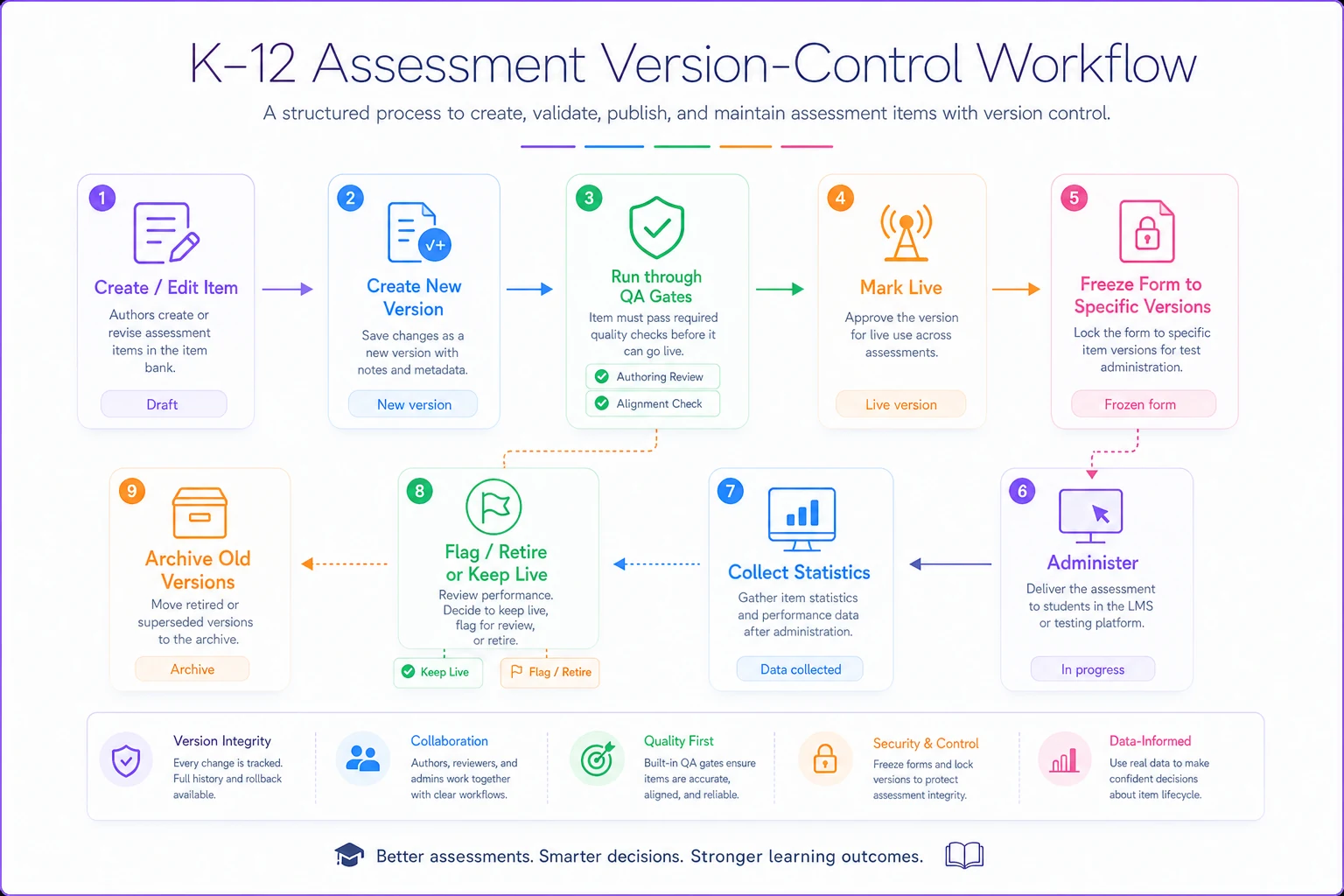
The image maps common steps so teams can trace versions and forms.
When lightweight is the right call — and when it isn't
There's a real temptation to over-engineer governance, especially right after something breaks. Resist it. The goal is a system light enough that busy people maintain it voluntarily.
Lightweight governance makes sense when your bank is under a few thousand items, your standards set is relatively stable, and you have two or three reliable people who own the metadata. Most district-level common-assessment programs live here. A shared status field, a version log, three QA gates, and an annual calendar are genuinely enough.
You need heavier machinery when you're pooling items across many schools with different priorities, you're doing high-stakes cohort comparisons where a drifting anchor item has real consequences, or you're managing enough volume that manual version tracking starts producing errors. At that scale, spreadsheet-based version control breaks down and you want a dedicated item-banking platform that enforces lifecycle states and versioning by default — so people can't accidentally skip a gate.
Who should probably not do this at all: a single teacher or a two-person grade team running a handful of quizzes. Formal item-bank governance for a tiny, low-stakes assessment set is bureaucracy for its own sake. The overhead only pays off when multiple people share a bank across time and the data actually gets used for decisions.
A short real scenario
A mid-sized district — around 4,000 students, eight schools sharing a common math assessment bank of roughly 1,200 items — kept running into the same argument every spring. Standards reports didn't match what teachers felt was happening in classrooms, and two schools flatly didn't trust the numbers.
The cause was exactly what you'd expect: no lifecycle status field, silent teacher edits over several years, and about a fifth of the tags pointing at standards that had been revised.
They didn't buy anything fancy first. They ran one summer alignment sweep, added a status field and version IDs, and froze that fall's forms to specific versions. The immediate payoff wasn't a score jump — it was that the spring argument mostly evaporated. When a report looked odd, they could trace it to a specific item version and either confirm or fix it. Trust in the data came back before any scores did. The following year they moved the bank onto a platform that enforced versioning automatically, mostly because maintaining it by hand across eight schools was eating a coordinator's time.
That order matters. The governance came first; the tooling just made the governance cheaper to sustain.
The point of all this
An assessment program's real asset isn't the questions — it's the trust that a given item, tagged a certain way, on a certain form, actually measured what everyone assumed, and that last year's numbers can be meaningfully compared to this year's. Tagging conventions, an anchor-maintenance calendar, QA gates, and version control aren't four separate best practices. They're four parts of one system that protects that trust as people change, standards shift, and the bank grows.
Get them working together and the program becomes something rare in schools: a body of assessment data people are willing to make decisions on, year after year, because they can always trace exactly what it means and where it came from. That traceability — not the item count, not the platform — is what separates a program that lasts from a folder of questions that slowly stops meaning anything.
Ready to elevate your classroom management?
Join 5,000+ educators using Skolyly to save time, engage students, and improve learning outcomes.