

Every district has a story about the rollout that ate three weeks of teaching. New LMS goes live in October. Half the logins don't work. IT is buried. Teachers spend their planning periods on hold, then burn the first ten minutes of class troubleshooting instead of teaching. Nobody planned for the friction, so it lands exactly where it hurts most—on instructional minutes that don't come back.
The frustrating part is that most of this is predictable. The problem isn't the software. It's that rollouts get scheduled around vendor timelines and procurement deadlines instead of the master-week calendar that actually governs when kids are learning. When those two calendars collide, instruction loses every time unless someone builds explicit rules to protect it.
This is a systems problem, not a training problem. If you want to protect instructional time during a tech rollout, you have to treat the rollout like an operational change with staging gates, named owners, negotiation scripts for the inevitable trade-off fights, and a plan B committed to before go-live. That's what this covers.
Why rollouts eat instruction (the failure runs deeper than "bad timing")
The usual explanation—"we picked a bad week"—is only the surface. The deeper issue is that most rollout plans have no protected block designed into them. The plan describes what changes and by when, but never which instructional minutes are off-limits no matter what.
Here's the chain that actually breaks:
-
Vendor sets a go-live date. It's tied to their onboarding capacity, not your calendar.
-
The date lands on a master-week that already carries load. Maybe it's an assessment window. Maybe it's the week PLCs are finalizing unit plans. Nobody cross-checks.
-
Something goes wrong at launch (there's always something), and the fix competes directly with teaching time because no one reserved buffer.
-
Teachers absorb the chaos personally. They improvise, lose minutes daily, and quietly conclude the new tool is the enemy—which tanks adoption later.
At a single school this looks like a rough couple of weeks. Across a district, the same launch multiplied across 40 buildings turns into thousands of lost instructional hours and a staff that distrusts the next rollout before it even starts. The coordination failure is invisible in the plan because the plan never named instruction as a protected resource.
If your master calendar already governs staffing and intervention blocks—which it should—the rollout is just another demand competing for those same minutes. The teams that get this right treat go-live like any other schedule negotiation, which is why the discipline in a master-calendar governance playbook carries directly into rollout planning.
The core idea: protected instructional blocks are non-negotiable inputs
Before staging, before scripts, before owners, one rule has to be locked: certain instructional blocks are inputs to the rollout plan, not variables the rollout gets to spend.
Keep every student on track with ease.
Skolyly helps you create, assign, and monitor classroom activities efficiently.
- Integrated lesson and assignment management
- Real-time student progress tracking
- Automated class scheduling & notifications
No credit card required
In practice that means defining, in writing, the blocks that cannot be touched:
-
Core content instruction (the daily reading/math block, or period-by-period core classes)
-
Existing intervention and enrichment blocks
-
Assessment windows already on the calendar
Everything else—prep periods, professional learning time, non-instructional homeroom, before/after school—is fair game for training, migration, and troubleshooting. The distinction sounds obvious, but almost no rollout plan writes it down, and that's exactly why it keeps getting violated. When a block isn't formally protected, it's implicitly available. Naming it flips the default.
One pattern worth flagging: districts often protect core instruction but forget intervention time, treating it as flexible. It isn't. Intervention blocks serve your most vulnerable students, and they're consistently the first thing sacrificed when a rollout runs long. Protect them with the same rigor. The logic behind scheduling that shields intervention and PLC time applies word-for-word here.
Staging options aligned to the master-week calendar
Not every rollout should be staged the same way. The right pattern depends on how deeply the tool touches daily instruction. Here's how the common options compare.
The table below summarizes common staging models and their trade-offs.
| Staging Model | How it works | Best when | Instructional risk |
|---|---|---|---|
| Cold cutover | Everyone switches on one date | Tool is low-touch (e.g., a back-office system) | High if instruction-facing |
| Cohort staging | One grade band or department goes first, others follow | Tool touches daily teaching; you want a controlled test | Low–moderate |
| Parallel run | Old and new systems run together for a window | Data integrity matters (gradebook, SIS) | Low, but doubles short-term workload |
| Off-cycle pilot | Launch during a naturally light week | You control the calendar and can wait | Lowest |
The mistake most teams make is defaulting to cold cutover because it's simplest to announce. It's rarely simplest to survive. For anything that touches how teachers deliver a lesson—LMS, new devices, a formative assessment platform—cohort staging almost always protects instruction better, because your first cohort surfaces the real problems while 80% of classrooms keep running normally.
If the tool touches daily instruction, prioritize a small first cohort in a low-load week to surface issues without risking districtwide minutes.
Aligning staging to the master week means mapping each stage onto specific, low-load weeks. A quick way to read your calendar for this:
-
Mark the immovable weeks. State testing, first two weeks of any term, the week before a major grading deadline. Nothing launches here.
-
Find the recovery-friendly weeks. Weeks with no assessment window and at least one built-in PD or half-day. These absorb friction well.
-
Sequence cohorts into recovery-friendly weeks. Cohort 1 in the first light week, a real pause to fix issues, then Cohort 2.
-
Leave a full buffer week between the last cohort and any high-stakes window. If it's still broken by then, you've bought yourself a decision point instead of a crisis.
Here's a simple visual of that staging workflow mapped to the master-week calendar for planning and communications.
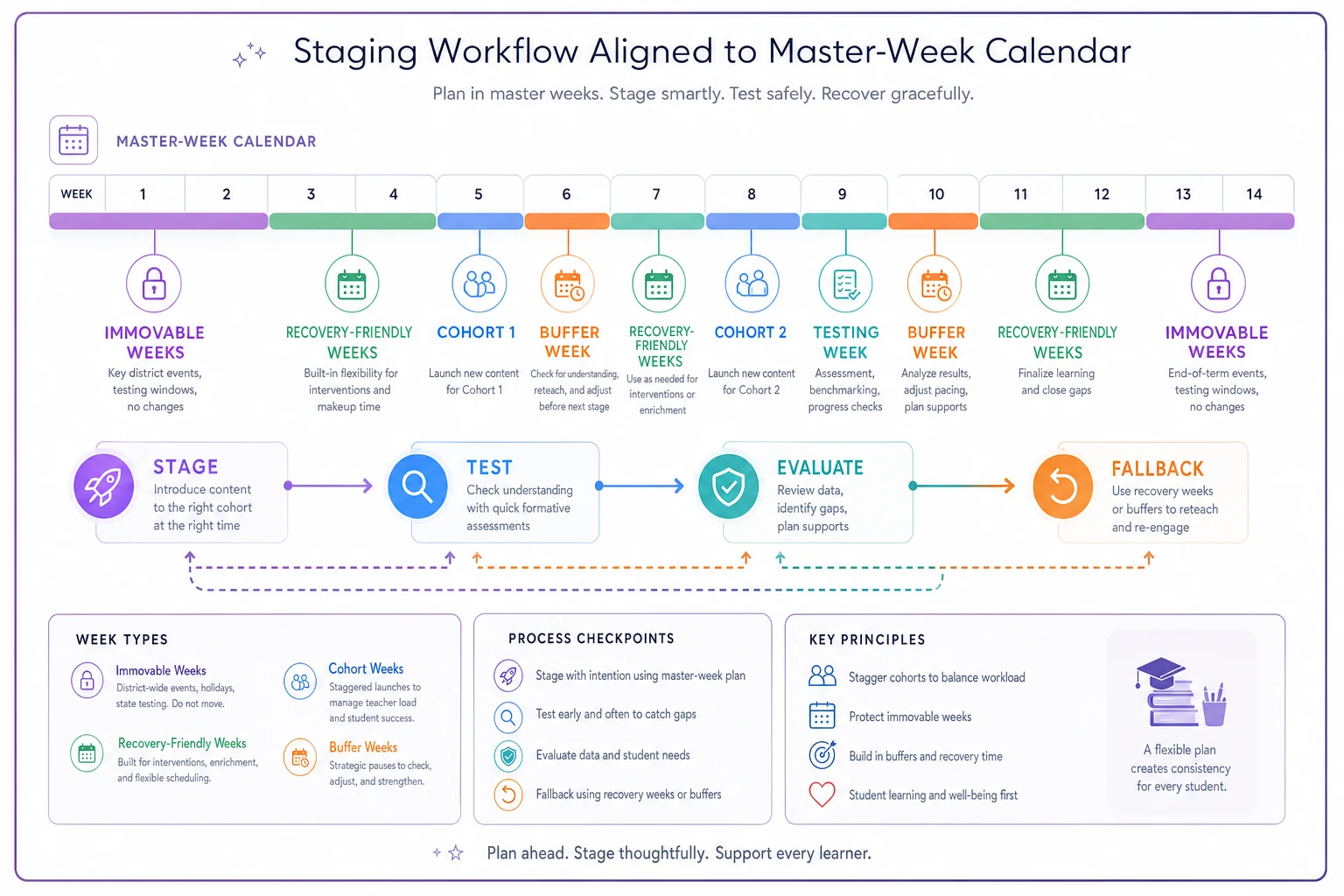
The visual helps teams see exactly where cohorts land and where buffers exist so the calendar conversation is concrete.
Negotiation scripts for the trade-off fights
Every rollout hits a moment where someone with authority wants to move faster than the calendar allows. The vendor wants their date. A cabinet leader wants the win before a board meeting. IT wants everyone on one system to reduce support load. These are legitimate pressures, and they'll steamroll instructional protection unless you have language ready.
The goal isn't to win an argument. It's to make the trade-off visible so the decision is made on purpose, not by default. A few scripts that hold up in real meetings:
When a vendor pushes a date onto a protected week: > "We can commit to onboarding starting that week, but our first live cohort has to land the week of the 14th—that's the first week clear of assessments. Moving it earlier means we launch into testing, and we won't do that. What can we prep in the meantime so we're ready to move fast on the 14th?"
When leadership wants a full cutover to hit a deadline: > "A full cutover on that date is possible, but here's the exposure: if logins fail like they did last spring, we lose instructional minutes in every classroom at once. A two-cohort stage hits the same finish line within two weeks and keeps 80% of classrooms running if something breaks. Which risk do we want to own?"
When IT wants to consolidate for support efficiency: > "I hear that supporting two systems is painful. Let's time-box the parallel run to three weeks and put a hard end date on it. That caps your support burden and still gives us a fallback if the gradebook migration goes sideways."
The shape is consistent: acknowledge the real pressure, name the instructional cost concretely, offer a path that meets their goal and protects the block. You're not blocking progress—you're making sure progress doesn't cost instructional minutes.
Owner roles: who actually holds the line
Rollouts drift when everyone is responsible and therefore no one is. You need a small set of named roles with clear authority. Titles matter less than the fact that a specific person owns each one.
-
Rollout owner — Owns the timeline and the go/no-go call. Single point of accountability.
-
Instruction protector — Usually an AP or instructional coach. Their job is to defend the protected blocks. They have veto power over any change that touches a locked block. This is the role most districts skip, and skipping it is why instruction loses.
-
Technical lead — Owns migration, logins, integrations, and the fix queue during launch.
-
Cohort captains — One per building or department. They collect ground-level problems and surface them fast, before small issues become schoolwide ones.
-
Communications owner — Runs the message cadence so teachers hear about changes before they experience them, not after.
The instruction protector role deserves emphasis. When it's a real person with real veto authority, the whole dynamic shifts. There's always someone in the room whose job is to ask "what does this do to teaching time?" Without that role, that question just doesn't get asked until it's too late.
Plan B: decide the fallback before you need it
The single biggest predictor of whether a rollout protects instruction isn't the launch plan. It's whether there's a committed, pre-agreed fallback. Teams that improvise plan B under pressure make bad calls—by that point they're emotionally invested in the launch succeeding and reluctant to pull back.
A usable fallback plan answers three questions in advance:
-
What's the trigger? Define the specific, measurable failure that flips you to plan B. "If more than 20% of teachers can't log in by end of day one" is a trigger. "If it feels rough" is not.
-
What's the fallback state? Usually
revert to the old system, keep the new one in a controlled pilot, and reschedule the broader launch to the next recovery-friendly week.
-
Who calls it? The rollout owner, in consultation with the instruction protector. Named in advance so there's no scramble.
Reverting is not failure. A clean revert that protects two weeks of instruction is a better outcome than a limped-through launch that bleeds minutes daily and poisons adoption. Frame it that way to your team ahead of time so nobody treats pulling the cord as an embarrassment.
Conflict-resolution rules that keep the launch from stalling
Even with owners and scripts, disputes happen. A cohort captain says the tool isn't ready; the technical lead says it's fine. The vendor and IT disagree on a fix. Without pre-set rules, these turn into hallway politics that delay decisions while instruction keeps taking hits.
A few rules that keep conflicts short:
-
Protected blocks are never the subject of debate. If a proposed fix touches a locked block, the instruction protector's veto ends the conversation. No re-litigating.
-
Decisions get made at the lowest level possible, escalated only when blocked. A cohort captain resolves a building issue; only cross-building conflicts go up.
-
Time-box every dispute. If a decision isn't reached in 24 hours, it auto-escalates to the rollout owner. Silence doesn't get to stall the launch.
-
Document the call and move on. A one-line note—what was decided, by whom, when. This kills the "wait, I thought we agreed…" churn that eats days.
Those rules keep the launch moving and stop small disagreements from turning into week-long stalls that cost instruction.
A real scenario: cohort staging saves a mid-year LMS launch
A mid-sized district—around a dozen K–8 buildings—planned a district-wide LMS cutover for the second week of January. The vendor pushed the date; procurement wanted the contract "used" before a budget review. Nobody checked it against the master week: that same window carried mid-year benchmark assessments in three grade levels.
The instructional coach, acting as instruction protector, flagged it. Instead of a cold cutover, they moved to two cohorts. Grades 6–8 went first, during a week clear of assessments. The launch surfaced exactly what you'd expect—a roster-sync problem that locked out roughly one class in five on day one. Because only three grade levels were live, the technical lead and cohort captains cleared the fix in about two days, with troubleshooting handled during prep periods and one after-school session, not during class.
Grades K–5 launched three weeks later into a smooth system. Estimated instructional time lost across the district came to a few hours total, mostly in the first cohort's early days. The original cold-cutover plan, by their own after-action estimate, would have hit every classroom during a benchmark window—easily ten times the lost minutes, plus a benchmark data mess. The tool itself was identical. The staging is what protected instruction.
When staged rollouts make sense—and when they don't
Staged, calendar-aligned rollouts make sense when:
-
The tool touches daily instruction (LMS, devices, assessment platforms)
-
A failure would hit multiple classrooms at once
-
You have any control over the launch date
A faster cutover can be fine when:
-
The tool is back-office and never touches a live classroom
-
The user group is small and easy to support
-
There's a clean, instant revert path if it fails
Who should not run a fast cutover: any district launching an instruction-facing tool during or adjacent to an assessment window, or any team without a named instruction protector and a pre-committed plan B. If those pieces aren't in place, slow down. The time you "save" on the calendar you'll lose in classrooms, several times over.
Bringing it together
Protecting instructional time during a tech rollout comes down to one shift in thinking: the master-week calendar governs the rollout, not the other way around. Once instructional and intervention blocks are locked as protected inputs, everything else—staging choices, negotiation language, owner roles, the plan B trigger—organizes around defending them.
The districts that pull this off aren't the ones with the best software or the biggest IT teams. They're the ones who decided, before go-live, exactly which minutes were off-limits, who had the authority to enforce that, and what they'd do the moment things went sideways. Build those rules into the plan and the rollout stops being a threat to teaching—it becomes just another scheduled change your calendar already knows how to absorb.
Ready to elevate your classroom management?
Join 5,000+ educators using Skolyly to save time, engage students, and improve learning outcomes.