

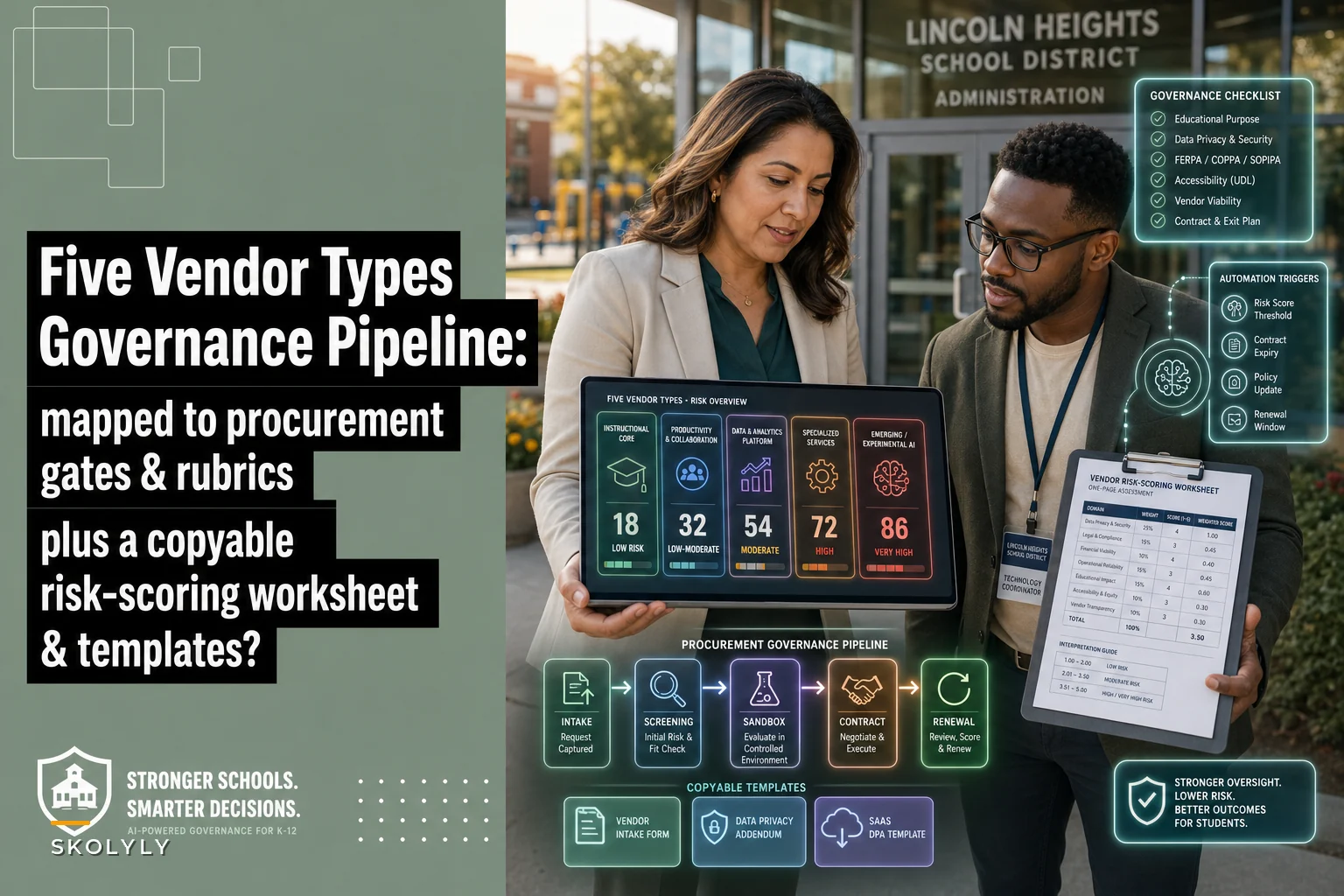

If you've already read through the district edtech governance pipeline and built out your procurement rubrics and interoperability gates, you've probably hit the next wall: okay, but what do we actually buy, who scores it, and how do we keep a two-person tech team from drowning in it?
This is the companion piece for that. No philosophy, no "why governance matters." You already bought in. Below are the five vendor/solution categories that actually earn their place in a pipeline, a vendor‑risk scoring worksheet you can rebuild in a spreadsheet this afternoon, a 1–5 procurement rubric with RFP language you can paste directly, and minimalist templates built for districts that don't have a dedicated procurement office. FTE and time estimates here are meant to be realistic. A district of 1,200 students does not run this the way a district of 40,000 does, and pretending otherwise is how governance plans end up abandoned in a shared drive by October.
The five vendor/solution types that belong in the pipeline
Most districts over-buy in one category and ignore three others. The pattern is pretty predictable: everyone has an LMS and a dozen content subscriptions, nobody has a rostering layer that actually works, and the privacy review tooling is a Google Doc somebody started in 2021. Here's how the five categories map to where they sit in the pipeline — intake, evaluation, integration, or ongoing monitoring.
| Solution type | Where it fits in the pipeline | Example firms (illustrative) | What it actually solves |
|---|---|---|---|
| Rostering & identity layer | Integration gate | Clever, Classlink, OneRoster-native tools | Kills manual CSV uploads and account chaos across every other tool |
| Privacy/data-governance tooling | Intake + ongoing monitoring | Student data privacy consortium tools, contract-tracking platforms | Tracks what data each vendor touches and whether the DPA is current |
| Interoperability & SIS integration middleware | Integration gate | SIS-adjacent connectors, LTI 1.3 managers | Prevents the "it doesn't talk to our SIS" surprise after purchase |
| Core instructional platforms (LMS / assessment / content) | Evaluation (pilot) | LMS vendors, adaptive content providers | The actual classroom product teachers use daily |
| Monitoring & adoption analytics | Ongoing monitoring | Usage-analytics dashboards, license-utilization tools | Shows whether anyone logs in before you renew |
A few notes from watching districts work through this.
The rostering layer is the one people skip and regret. A district will pilot three reading platforms beautifully, pick one, then discover account provisioning is a manual nightmare because they never put a real identity layer in the integration gate. If you've dealt with messy syncs before, you already know how much teacher time disappears into "my class list is wrong again." Rostering belongs early in the pipeline, not as an afterthought once you've already committed to something.
Privacy tooling is intake AND monitoring — not a one-time gate. Treating the Data Privacy Agreement review as a box you check once at purchase is where things fall apart. Vendors change subprocessors. They get acquired. Their privacy policy quietly updates in July when nobody's reading email. A privacy tool that only lives at intake is half a tool.
Monitoring and adoption analytics is the category small districts almost never buy — and then they renew a $38k platform that 11% of teachers ever opened. You don't always need a dedicated product here; sometimes your LMS admin console gives you enough. But someone has to own the number.
When buying a dedicated tool in a category actually makes sense
-
Rostering
worth a dedicated tool once you're running more than roughly 5–6 integrated platforms. Below that, manual OneRoster exports may genuinely be fine.
-
Privacy/contract tracking
worth it once you're past around 25–30 active vendor agreements and losing track of renewal dates.
-
Monitoring analytics
start with what's built into tools you already pay for. Only buy a standalone product if your platforms don't expose usage data.
When it's a bad idea
Buying middleware before you've mapped your actual SIS fields is backwards — you'll configure a connector around assumptions that turn out wrong. And buying a shiny adoption-analytics dashboard when your core problem is that teachers were never trained is just spending money to confirm bad news.
The edtech vendor risk scoring worksheet
This is the part most districts want and the part that's hardest to find done concretely. Below is a numeric scoring worksheet you can rebuild in a spreadsheet. The point is to turn "this vendor feels sketchy" into a number people can actually defend in a board meeting.
Keep every student on track with ease.
Skolyly helps you create, assign, and monitor classroom activities efficiently.
- Integrated lesson and assignment management
- Real-time student progress tracking
- Automated class scheduling & notifications
No credit card required
The six factors and their weights
| Factor | Weight | What a 5 looks like | What a 0–1 looks like |
|---|---|---|---|
| Data sensitivity & scope | 25 | Minimal PII, no behavioral/biometric data | Collects student PII + behavioral data, unclear purpose |
| DPA / contract strength | 20 | Signed DPA, clear deletion & breach terms | No DPA, vague ownership, no deletion clause |
| Interoperability | 15 | Native OneRoster/LTI 1.3, SSO ready | Manual CSV only, no SSO |
| Financial/vendor stability | 15 | Established, funded, clear roadmap | Early startup, unclear funding, frequent pivots |
| Subprocessor transparency | 15 | Full subprocessor list, change notifications | Won't disclose subprocessors |
| Support & adoption track record | 10 | Strong references, real PD resources | No references, thin support |
The formula
Risk Score = Σ (factorscore × factorweight) / 5
Dividing by 5 normalizes the result to a 0–100 scale, since the max raw total is 500.
The thresholds
-
80–100 → Approve. Standard review, move to pilot or integration gate.
-
60–79 → Conditional. Approve with specific remediation (e.g., require signed DPA, confirm subprocessors) before contract.
-
40–59 → Hold. Senior review required. Usually means a real gap, not a paperwork gap.
-
Below 40 → Decline, or require a formal exception approved above the committee level.
One rule that saves you later: any factor scored 0 on "Data sensitivity" or "DPA strength" caps the whole vendor at Conditional, regardless of total. A vendor can't average its way out of having no data protection agreement. This override is the single most important line in the whole worksheet, and it's the one people forget to add.
Worked example
| Factor | Score (0–5) | Weight | Weighted |
|---|---|---|---|
| Data sensitivity & scope | 3 | 25 | 75 |
| DPA / contract strength | 4 | 20 | 80 |
| Interoperability | 5 | 15 | 75 |
| Financial stability | 2 | 15 | 30 |
| Subprocessor transparency | 3 | 15 | 45 |
| Support & adoption | 4 | 10 | 40 |
| Total | 345 |
345 / 5 = 69 → Conditional.
The number tells the real story: strong on interoperability, decent DPA, but a financial-stability score of 2 (small, recently-funded vendor) and middling subprocessor transparency pulled it into Conditional. The remediation becomes obvious — get the full subprocessor list and add a data-escrow or exit clause in case the vendor folds. You're not rejecting the product; you're pricing in its specific risk.
That's the whole value of scoring numerically. "It feels risky" gets argued forever. "It's a 69, and here are the two factors that dragged it down" gets resolved in one meeting.
The 1–5 procurement rubric and RFP language you can paste
The scoring worksheet above is for risk. This rubric is for fit — whether the thing actually does what you need. Keep them separate. A product can be low-risk and a terrible instructional fit.
Procurement rubric (1–5)
| Dimension | 1 | 3 | 5 |
|---|---|---|---|
| Instructional alignment | Loosely related to standards | Aligns to most target standards | Directly maps to your scope & sequence |
| Teacher workflow fit | Adds steps, duplicate data entry | Neutral, some friction | Reduces steps teachers already do |
| Evidence of impact | Vendor claims only | Some third-party or peer data | Independent evidence or strong peer references |
| Accessibility | Gaps in WCAG/ADA | Mostly compliant | Full compliance + documentation |
| Total cost clarity | Hidden per-seat/API fees | Mostly clear | Fully transparent, multi-year priced |
Score each 1–5, average them, and pair the average with the risk score. A simple decision frame: fit ≥ 3.5 AND risk ≥ 60 moves forward.
RFP language snippets
Data protection: > "Vendor shall execute the District's Data Privacy Agreement prior to any data transfer. Vendor shall maintain a current, publicly accessible list of all subprocessors and shall notify the District in writing no fewer than 30 days before adding or changing any subprocessor with access to student data."
Data deletion & exit: > "Upon contract termination or non-renewal, Vendor shall delete or return all District data within 45 days and provide written certification of deletion. Vendor shall support bulk data export in a non-proprietary format throughout the contract term."
Interoperability: > "Platform shall support OneRoster 1.1 (or later) and SSO via SAML 2.0 or OIDC. Vendor shall confirm LTI 1.3 compatibility where applicable. Manual roster upload shall not be the primary provisioning method."
Usage transparency: > "Vendor shall provide District administrators with access to per-user and per-school login and activity data, exportable at least monthly, for the purpose of monitoring adoption prior to renewal decisions."
That last one is quietly powerful. Making usage data a contractual right is how you stop renewing tools nobody uses.
Minimalist templates for small districts
Big-district procurement advice assumes a procurement office. If you're a 900-student district where the "committee" is the tech director, a principal, and whoever answers the email, you need something lighter. These templates run on tools you already have.
1. Intake (Google Forms → Google Sheets or Airtable)
Build a single intake form. Any teacher or administrator requesting a tool fills it out. Fields:
-
Requesting staff + school
-
Tool name + vendor URL
-
What problem it solves
-
Student data it would touch (none / directory / PII / behavioral)
-
Estimated users and cost
-
Is there an existing tool that does this? (forces a duplication check)
Pipe responses into a Sheet or Airtable base. The data-touch field is the one that routes everything — "PII" or "behavioral" auto-flags the request for the full risk worksheet; "none" can take a lighter path.
If possible, have the intake form write the vendor row directly to your base with the privacy-policy URL to avoid duplicate data entry later.
2. Sandbox testing checklist
-
- [ ] Test account created with dummy roster
-
- [ ] SSO login tested with a test identity
-
- [ ] Roster sync tested (OneRoster/CSV) and verified correct
-
- [ ] Mobile/tablet access confirmed if relevant
-
- [ ] Accessibility spot-check (screen reader, keyboard nav)
-
- [ ] Data export tested — can you actually get your data out?
-
- [ ] Admin console reviewed for usage reporting
That export test catches more problems than almost anything else. Districts discover at renewal that three years of student work is locked inside a vendor with no bulk export. Catch it in the sandbox.
3. Teacher adoption milestones
-
Week 2 — ≥70% of target teachers logged in at least once.
-
Week 6 — ≥50% using it in instruction weekly (quick pulse survey).
-
Week 12 — adoption steady or climbing; collect two short teacher quotes on friction.
If Week 2 is under 50%, the problem is almost always onboarding, not the product. Fix training before you blame the tool.
4. Contract clause checklist
-
- [ ] Signed DPA on file
-
- [ ] Data deletion/return clause with timeline
-
- [ ] Subprocessor disclosure + change notification
-
- [ ] Breach notification window specified
-
- [ ] Bulk data export right stated
-
- [ ] Usage-data access right stated
-
- [ ] Auto-renewal terms understood (and opt-out date calendared)
That last checkbox prevents the most common and most avoidable cost: a tool auto-renewing because nobody caught the 60-day cancellation window.
Estimated FTE and time per stage
Rough numbers for a small-to-mid district. Scale up for size.
| Stage | Who | Time per vendor |
|---|---|---|
| Intake review | Tech director | 15–20 min |
| Risk scoring | Privacy/data lead | 45–90 min |
| Sandbox testing | Tech staff + 1 teacher | 2–4 hours |
| Procurement rubric scoring | Committee (3 people) | 1 hour |
| Contract clause review | Admin + legal if available | 1–3 hours |
| Adoption monitoring | Building lead | ~30 min/checkpoint |
Across a year, a district reviewing 20–30 new tools is looking at a meaningful but manageable load — roughly 0.2–0.4 FTE spread across a few people, if the templates do the routing. Without templates, the same work balloons because everything gets re-litigated from scratch each time.
The automated vendor-change monitoring play
Almost nobody runs this, and it's cheap to set up.
The risk isn't the vendor you approved. It's the vendor who changes six months later — new subprocessor, updated privacy policy, acquisition — while your DPA sits frozen in a drive.
A lightweight monitoring workflow using Zapier or Power Automate:
-
Keep a vendor list in your Airtable base or Sheet with each vendor's privacy-policy URL and renewal date.
-
Set a monitoring trigger — a scheduled check or a service that watches a URL for changes — on each vendor's privacy/subprocessor page.
-
On change detected, auto-create a task assigned to your privacy lead: "Review [Vendor] policy change — compare to DPA."
-
On renewal date minus 90 days, auto-send a reminder to pull usage data and re-run the risk score.
A plain version: a monthly scheduled Zap that emails your privacy lead the list of vendors whose renewal falls in the next 90 days, with their last risk score attached. Fifteen minutes to build. It turns renewals from fire drills into a routine review.
The deeper point is that intake, scoring, sandbox results, and monitoring shouldn't live in four disconnected places. When a privacy-policy change can automatically reopen the exact risk record you scored eight months ago, the pipeline stops depending on someone remembering to check. That's the difference between governance that holds and governance that quietly collapses by spring. Operational workflow platforms that centralize these records and automate the monitoring triggers are worth looking at once your vendor count grows past the point where a spreadsheet starts losing things.
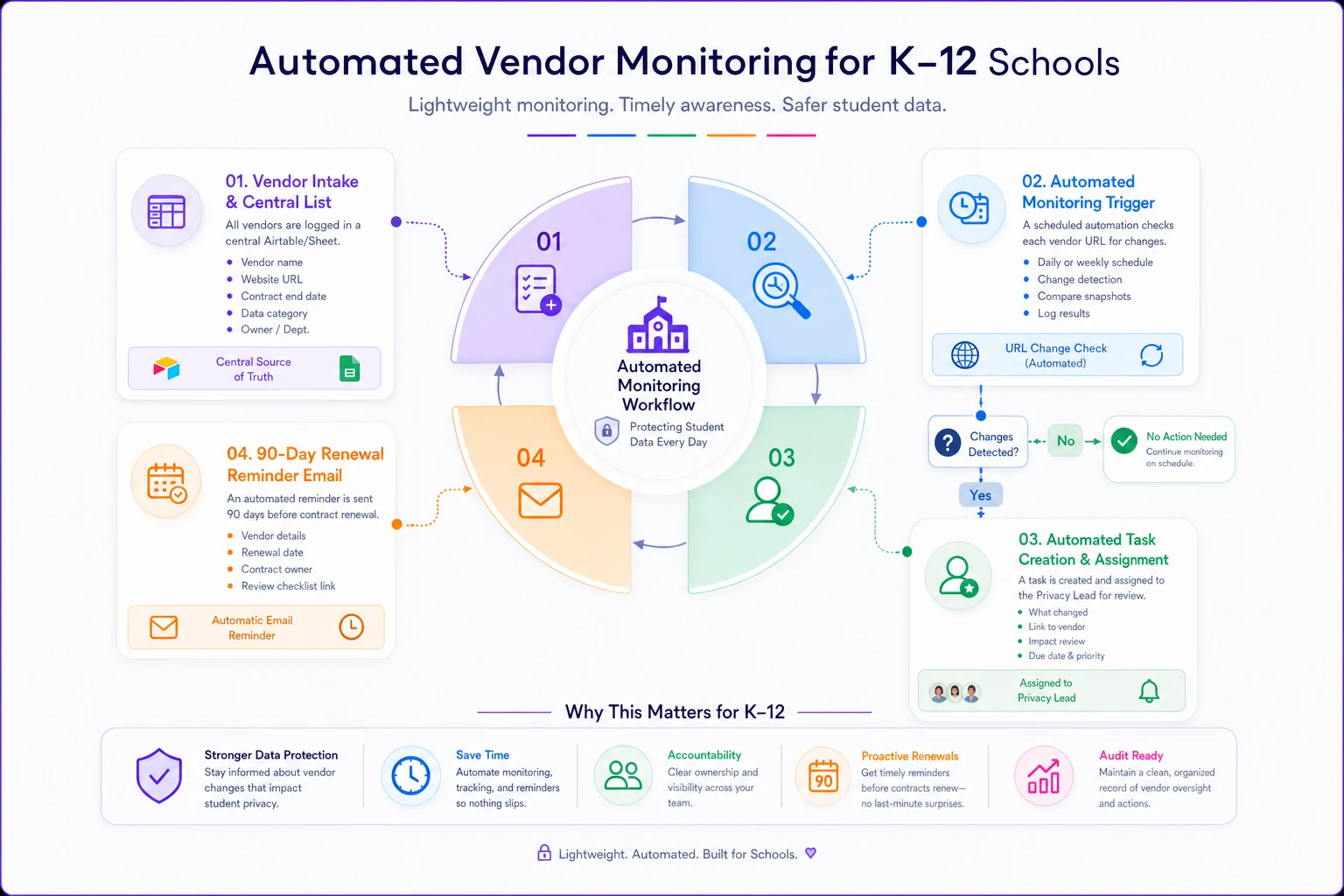
This visual maps the simple automation: vendor list → change detection → task creation → renewal reminder.
Where small districts should start
You don't have to stand all of this up at once. If you're starting from a shared Google Doc and good intentions, do it in this order:
-
Build the intake form this week. One form, routed to a sheet.
-
Rebuild the risk scoring worksheet with the six factors and the hard override.
-
Add the contract clause checklist and calendar your auto-renewal opt-out dates.
-
Set up the 90-day renewal reminder in Zapier or Power Automate.
-
Layer in adoption milestones once the intake side is running smoothly.
The districts that keep governance alive aren't the ones with the fanciest tools — they're the ones who made each step small enough that a two-person team can actually do it on a Tuesday afternoon. Keep the worksheet honest, keep the templates light, and let the monitoring run itself. That's the version that's still working in March.
The districts that keep governance alive aren't the ones with the fanciest tools — they're the ones who made each step small enough that a two-person team can actually do it on a Tuesday afternoon. Keep the worksheet honest, keep the templates light, and let the monitoring run itself. That's the version that's still working in March.
Ready to elevate your classroom management?
Join 5,000+ educators using Skolyly to save time, engage students, and improve learning outcomes.