


Project-based learning creates incredible student work. It also creates grading nightmares that have teachers spending entire weekends buried in rubrics, trying to write meaningful feedback for 120+ submissions while maintaining any semblance of consistency.
The typical scenario: you assign a research project or multimedia presentation. Students spend three weeks on something genuinely meaningful. Then you spend the next two weekends grading them, writing variations of the same comments over and over, second-guessing your rubric scores, and wondering if student #87 really deserves the same grade as student #12 when you can barely remember what student #12 submitted.
By Sunday night you're writing "Good job!" and "Needs more detail" because your brain checked out somewhere around submission #45.
The grade-banding breakthrough most teachers miss
Traditional rubrics pretend precision exists where it doesn't. The difference between an 87 and an 89 on a complex project? Mostly fiction we've convinced ourselves matters.
Grade banding acknowledges what experienced teachers already know: student work naturally clusters into performance levels. Instead of agonizing over whether a project deserves 86 or 88 points, you're making clearer decisions — does this fall into the B+ band or the B band?
Here's the operational breakdown:
Pre-grading setup (15 minutes per project, done once):
-
Create 4-5 grade bands (A range, B range, C range, etc.)
-
Select 2 exemplar anchors per band from previous years
-
Develop comment banks for common issues
-
Design peer review protocol with specific prompts
During-project checkpoints (5 minutes per student, twice):
-
Quick progress scan using single-point rubric
-
Flag major issues early
-
Document completion status
Final grading sprint (3-4 minutes per student):
-
Review peer assessments first
-
Compare to band exemplars
-
Select grade band
-
Customize 2-3 comment templates
-
Add one specific praise point
Combined with structured peer assessment and exemplar anchoring, this approach cuts grading time to roughly 40 minutes per class period while actually improving feedback quality.
Why peer assessment actually speeds up grading (when structured right)
Most peer assessment fails because students don't know what to look for. They write vague praise or fixate on surface stuff like font choices. Structured peer protocols change this.
Keep every student on track with ease.
Skolyly helps you create, assign, and monitor classroom activities efficiently.
- Integrated lesson and assignment management
- Real-time student progress tracking
- Automated class scheduling & notifications
No credit card required
Instead of "evaluate your partner's project," students get specific tasks:
Round 1 - Technical check (5 minutes):
-
Does the introduction clearly state the main argument?
-
Count the number of credible sources cited
-
Identify the strongest evidence presented
-
Find one claim that needs more support
Round 2 - Clarity scan (5 minutes):
-
Mark three sentences that were confusing
-
Highlight the clearest explanation in the project
-
Note any undefined technical terms
-
Check if conclusions match the evidence
Round 3 - Comparison rating (3 minutes):
-
Students compare the project to the provided exemplars and select which band it most closely matches, with a required explanation.
When you sit down to grade, you're not starting from scratch. You have three peer perspectives already highlighting specific strengths and gaps. Students have done the detail work for you.
The exemplar anchor system that eliminates grading drift
Grading drift kills consistency. Project #1 gets detailed analysis. Project #50 gets a tired skim. Project #100 might get graded more harshly because you're frustrated that students keep making the same mistakes.
Exemplar anchors give you concrete comparison points throughout the grading session. Keep physical or digital copies of two exemplars per band visible while grading. When you're unsure about a project, hold it against the anchors — is it closer to the B+ exemplar or the B- exemplar? Decision made. Move on.
| Grade Band | Exemplar Characteristics | Time to Identify |
|---|---|---|
| A range (90-100) | Exceeds all requirements, creative approach, publication-ready | 30 seconds |
| B range (80-89) | Meets all requirements, solid execution, minor gaps | 45 seconds |
| C range (70-79) | Meets most requirements, basic execution, several gaps | 45 seconds |
| D range (60-69) | Meets some requirements, significant gaps, unclear sections | 60 seconds |
| F range (below 60) | Missing major requirements, incomplete, off-topic | 20 seconds |
The table above is a rough guide, not a rigid formula. You'll adjust band descriptions as you develop exemplars specific to your project types.
Comment templates that stay meaningful
Generic feedback helps nobody. But writing unique comments for every student burns hours. The solution: modular comment templates with specific insertion points.
Structure praise (choose one, customize the bracketed section):
-
"Your [specific section] demonstrates strong analytical thinking, particularly where you [specific example]"
-
"The connection you drew between [concept A] and [concept B] shows sophisticated understanding"
-
"Your use of [specific evidence/source] to support [specific claim] was particularly effective"
Growth areas (choose one or two, customize):
-
"To reach the next level, focus on [specific skill]. For example, in your section about [topic], you could [specific suggestion]"
-
"Your argument would be stronger with more evidence supporting [specific claim]. Consider adding [type of evidence]"
-
"The progression from [section A] to [section B] needs clearer transitions. Try [specific technique]"
Specific technique feedback (choose relevant ones):
-
"Your visual elements support your argument well, especially [specific visual]"
-
"Citation format needs consistency — check [specific issue] throughout"
-
"Your conclusion successfully [specific strength] but could better address [specific gap]"
Build your comment in 30 seconds: one praise, one growth area, one specific technique note. The specificity comes from filling in the brackets with actual content from their project.
The actual workflow in practice
Here's what grading a set of 28 research presentations looks like using this system.
-
Thursday before due date (20 minutes) Pull up your exemplar anchors. Review your grade bands. Update your comment bank if needed. Post peer review assignments.
-
Friday in class (50 minutes) Students complete structured peer reviews. You circulate, answering questions and spot-checking progress. Collect peer review forms digitally or physically.
-
Friday after school (10 minutes) Quick scan of peer reviews to identify any projects flagged with major issues. Make note of these for closer attention.
-
Saturday morning (90 minutes for 28 projects) Set up your workspace with exemplar anchors visible. Open your comment template document.
Here's a quick visual of the workflow.
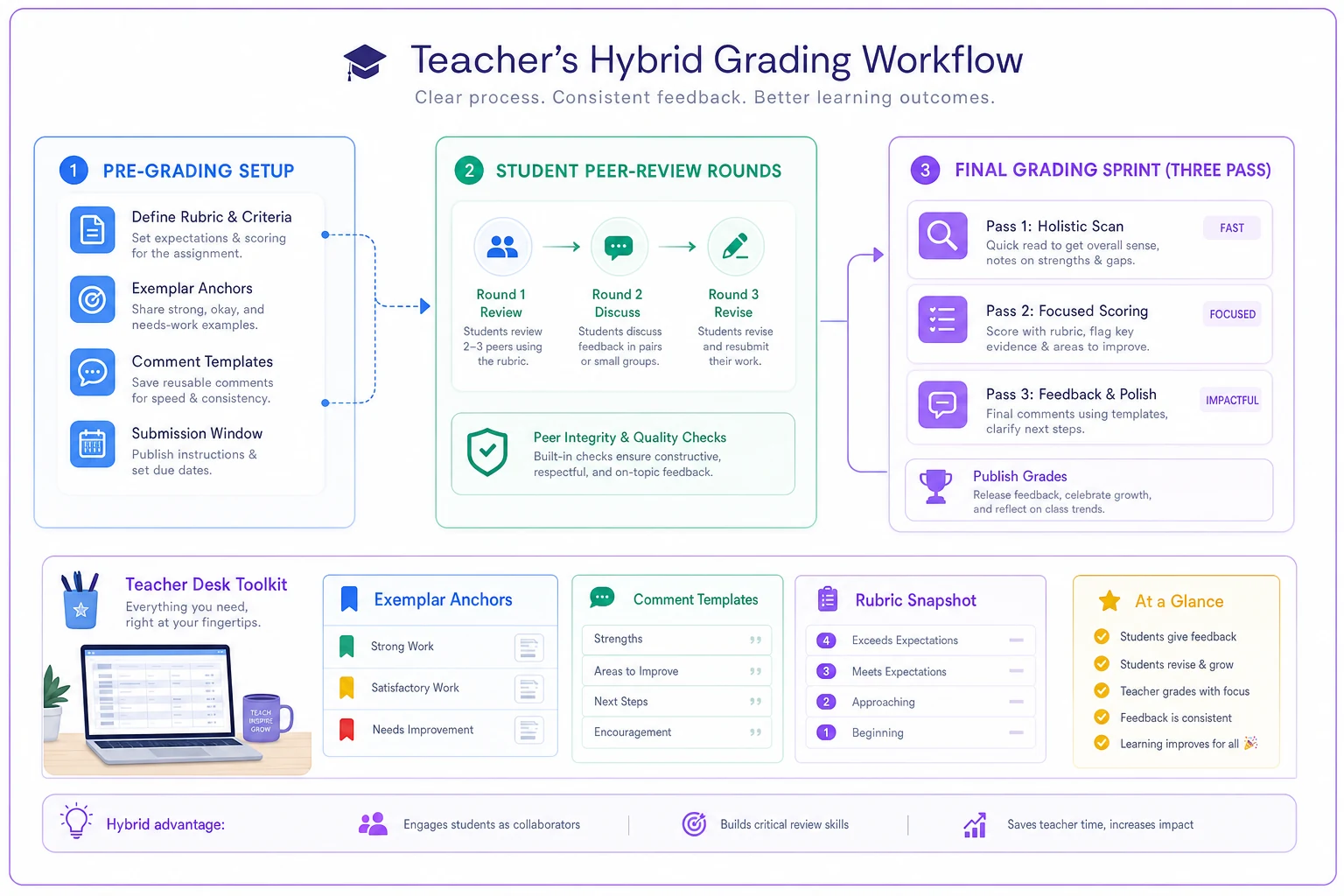
Saturday's grading runs in three passes:
-
First pass (20 minutes)
Skim all projects for completion and basic requirements
-
Second pass (40 minutes)
Assign grade bands using exemplars and peer input
-
Third pass (30 minutes)
Add customized comments from templates
Average time per project: around 3 minutes. Traditional detailed grading time for the same set: closer to 6 hours.
When this system breaks down (and how to adapt)
This workflow assumes relatively standard project parameters. Some situations need adjustments.
Creative projects with no clear "correct" outcome: Grade bands still work, but exemplars need to show range rather than quality levels. Focus peer review on effort indicators and process documentation rather than output evaluation.
Technical projects requiring accuracy checks: Add a separate accuracy verification step. Peer review can surface issues, but you'll need to spot-check calculations or code functionality. Budget extra time for that.
First-time project types: Without previous exemplars, grade the first 5 or 6 traditionally to establish bands, then retroactively adjust if needed. It's an upfront investment that pays off next semester.
Small classes (under 15 students): Peer review becomes less reliable with fewer perspectives. Consider having each project reviewed by two peers instead of one, or run gallery-walk style whole-class feedback sessions instead.
The comment quality paradox
Limiting your comment options often produces better feedback than unlimited writing time — which sounds counterintuitive but holds up in practice.
When you have 20 minutes to grade a project, you might write paragraph-long comments trying to cover everything. Students skim them, feel overwhelmed, and act on nothing.
When you have 3 minutes and must choose your battles, you zero in on the one or two changes that would most improve their work. Students actually read these. They actually implement them.
A focused comment like "Your evidence in section 2 would be stronger with specific statistics rather than general statements — see the exemplar's use of data" beats a full page of scattered observations every time.
Building your resource bank over time
The first time through takes longer. You're creating exemplars, writing comment templates, designing peer protocols. But these become reusable assets.
Semester 1: Create basic bands, collect exemplars as you grade, draft initial comment templates
Time investment: Extra 2-3 hours total
Semester 2: Refine bands based on experience, curate best exemplars, expand comment bank
Time investment: 30 minutes prep
Year 2: System runs smoothly, minor adjustments only
Time investment: 10 minutes prep
By Year 3: You have exemplars for multiple project types, refined comment banks, proven peer protocols
Time saved per grading cycle: 4-5 hours
Track which comments you use most frequently — those become your core templates.
Note which exemplars best illustrate band differences. Those become your anchors.
Software that handles the logistics
The manual version of this system works. But keeping track of peer assignments, comment banks, and grade distributions across multiple classes gets messy fast.
AI-powered grading assistance platforms now handle a lot of that administrative weight. They can automatically distribute peer reviews, compile feedback, suggest relevant comment templates based on content analysis, and track grade band distributions to flag potential drift.
These tools don't grade for you — they organize the workflow so you can focus on the actual evaluation. Think of them as operational software that manages the process while you maintain full control over the pedagogical decisions.
The more effective platforms learn your comment patterns over time, surfacing increasingly relevant feedback options while preserving your voice and standards. They also surface patterns in common student struggles, which can help you adjust instruction before the next project cycle rather than discovering the same gaps six weeks too late.
The sustainable grading reality
Perfect individualized feedback for every student on every project isn't sustainable. Teachers burning out from grading marathons don't help anyone.
This hybrid workflow acknowledges that reality. You have limited time and energy. Instead of spreading yourself thin trying to provide comprehensive feedback that students might not even read, you're delivering focused, actionable guidance that actually improves their next project.
The peer component builds student evaluation skills. The banding system maintains consistency without false precision. The exemplar anchors keep standards clear. The comment templates ensure quality without repetition.
Most importantly, you're not spending entire weekends grading. You're using a focused 90-minute session to provide meaningful assessment, then actually having a weekend. Your students get feedback faster, you maintain consistent standards, and nobody gets shortchanged because you're exhausted by project #75. That's what a functional grading system actually looks like — not cutting corners, but building something that delivers real value without burning out the person running it.
Ready to elevate your classroom management?
Join 5,000+ educators using Skolyly to save time, engage students, and improve learning outcomes.