


You know that student who disrupted reading group three times yesterday? By Friday, you're struggling to remember if it was three times or five, and whether that was better or worse than last week. Parent conference comes around, and you're left with vague impressions instead of anything concrete.
Most behavior tracking systems die after two weeks. Not because teachers don't care about documentation—but because entering detailed notes for 24 students while managing dismissal chaos just doesn't happen. The fancy behavior apps with 15 dropdown menus per incident? Those get abandoned even faster.
Why behavior tracking breaks down in elementary classrooms
Elementary teachers manage somewhere around 480 behavioral moments per day across their classroom. Redirections, positive reinforcements, minor incidents, everything. Traditional documentation expects you to capture maybe 5% of these through detailed incident reports.
The math never worked. If you spend even two minutes documenting each significant behavior, you're looking at 20-30 minutes daily just on tracking. That's your entire lunch period, or half your planning block gone.
What actually happens? Teachers develop mental tallies that fade by Wednesday. They scribble cryptic notes on sticky notes that disappear. They promise themselves they'll write it up later during planning, except planning gets consumed by actual lesson prep. The documentation that does happen tends to capture only extreme behaviors—the meltdown during math, the pushing incident at recess. The daily patterns that matter most for intervention get completely lost.
The checkbox system that changed my perspective
A second-grade teacher showed me her actual tracking system last spring. Not the official district one. Her real one. She had created a grid on index cards—one per student who needed monitoring. Five behavioral goals across the top (staying seated, raising hand, completing work, kind words, following directions). Five periods down the side (morning work, reading block, math, specials, afternoon).
Keep every student on track with ease.
Skolyly helps you create, assign, and monitor classroom activities efficiently.
- Integrated lesson and assignment management
- Real-time student progress tracking
- Automated class scheduling & notifications
No credit card required
During transitions, she'd quickly mark checks or X's. Maybe 15 seconds per card, four or five cards total. At the end of each day, she'd snap a photo with her phone before recycling the card and starting fresh.
"This is the only thing I can actually maintain," she told me. "But I lose all the patterns because I can't go back and see trends."
She was tracking around 100 data points weekly but had no way to compile them into something useful for RTI meetings or parent conversations. Good system, incomplete picture.
Building a micro-workflow that sticks
The most effective behavior tracking happens when it becomes invisible within existing routines. Not another task to remember, but a natural extension of what you're already doing during transitions.
Here's what teachers actually stick with:
Morning setup (30 seconds) Place tracking cards on your small group table or clipboard. Today's focus students only—typically 3-6 kids who need close monitoring. Pre-printed with behaviors you're actually tracking, not generic district categories.
During instruction (5 seconds per observation) Quick taps or marks as behaviors happen. No stopping instruction. No detailed notes. Just: behavior happened or didn't. Think of it like taking attendance—binary, quick, done.
Transition moments (20 seconds) While students pack up for specials or lunch, quick scan and mark the period that just ended. Four checkmarks for Jenny staying in seat during reading. Two X's for Marcus calling out.
End of day (90 seconds) Transfer marks to a simple digital log. Not lengthy descriptions—just codes. "M-RC2-RB" (Marcus, calling out twice, reading block). Photo backup of the physical card.
Friday automation (0 minutes) System generates a weekly summary automatically. Shows patterns you'd never catch manually. Marcus calls out significantly less during hands-on activities. Jenny's seat-staying improves noticeably after movement breaks.
Here's a quick visual of that micro-workflow.
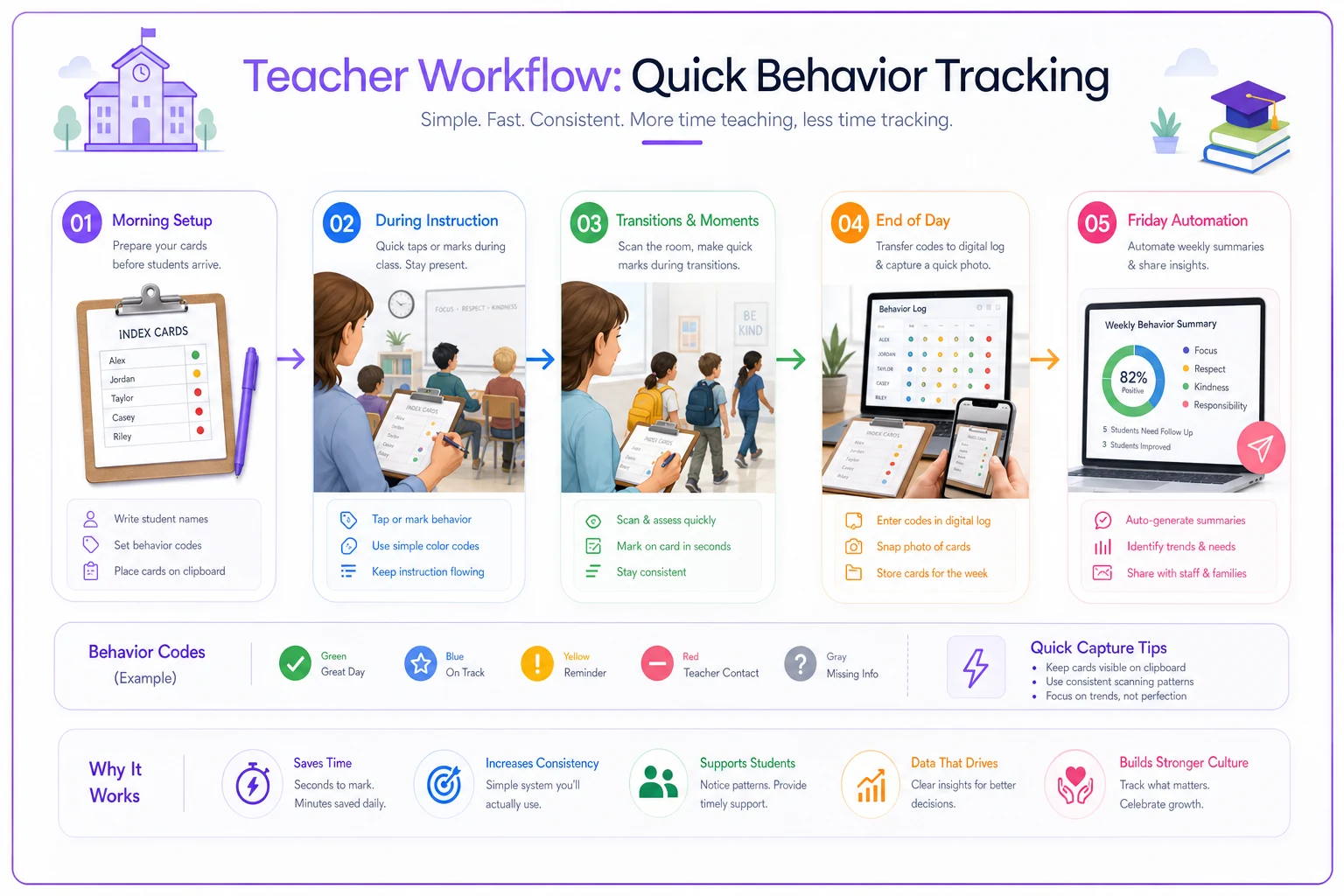
The visual shows how the workflow fits into moments you already have, from morning setup through Friday automation.
The codes that capture everything without writing anything
Effective behavior codes strip away the narrative and capture just the data. You're not writing "Student became frustrated during independent math work and threw pencil across room." You're marking "F-TH-MA-I" (Frustration, throwing, math, independent).
A working code system might look like this:
| Behavior Type | Quick Code | Example Use |
|---|---|---|
| Calling out | CO | CO3 (3 times) |
| Out of seat | OS | OS-T (during transition) |
| Work refusal | WR | WR-M (math specific) |
| Physical contact | PC | PC-R (at recess) |
| Task completion | TC+ | TC+ (completed) |
| Following directions | FD | FD- (didn't follow) |
| Positive peer interaction | PP+ | PP+G (during group work) |
The key is keeping it to 10-12 codes maximum. If you still need a reference sheet after week one, the system's too complex.
Patterns that emerge after two weeks
Once you're capturing behavior data consistently, patterns start becoming obvious. That student who seems "always disruptive"? The data often shows 90% of incidents happen during whole-group instruction, almost none during hands-on activities. The child who "never completes work"? Actually finishes most tasks when given a two-minute warning before transitions.
A third-grade teacher tracking five students discovered her most disruptive student actually had fewer incidents than a quiet student whose subtle work avoidance had gone completely unnoticed. The data showed the quiet student started 0% of independent tasks without individual prompting, while the "disruptive" student just needed movement breaks every 20 minutes or so.
These patterns become your intervention roadmap. Not guessing what might help, but knowing exactly when and where behaviors spike.
Parent communication that writes itself
Weekly summaries change parent communication from defensive to collaborative. Instead of "Your child had a rough week," you're sharing: "Marcus had 12 calling-out incidents this week, down from 18 last week. Progress is happening mainly during math block where we implemented hand signals."
Setting simple thresholds helps too. More than 15 incidents weekly triggers an email home. Three days of work refusal in specific subjects flags for parent contact. Positive trends generate celebration messages.
One teacher found that positive trend notifications completely changed parent dynamics. Parents who previously only heard from school during crisis moments suddenly received "Emma stayed in seat 85% of reading block this week, up from 60%" messages. Parent conferences shifted from damage control to actual strategy sessions.
The data that actually helps during RTI meetings
RTI teams need trends, not stories. When you walk into that meeting with eight weeks of checkbox data showing clear patterns, the conversation shifts. You're not discussing what to try—you're looking at what the data already shows about triggers and response.
Your five-minute daily investment produces:
-
Baseline behavior rates before intervention
-
Clear progress monitoring during intervention
-
Objective success metrics
-
Specific trigger patterns
-
Time-of-day and subject-specific trends
Compare that to walking in with memory-based observations and sticky note reminders. The checkbox teacher presents: "During baseline, Marcus averaged 3.4 calling-out incidents during whole-group instruction. After implementing wait time signals, this dropped to 1.2 incidents. Improvement has held across three weeks."
When simplified tracking isn't enough
This micro-workflow works for typical classroom behaviors and mild intervention needs. It doesn't replace formal behavior intervention plans for students with IEPs requiring detailed documentation. It won't capture the antecedent-behavior-consequence chains needed for functional behavior assessments.
If you're dealing with safety behaviors, aggression, or students who need intensive support, you need the full documentation system. The five-minute workflow is for the roughly 80% of behavior tracking that helps general education teachers spot patterns and communicate effectively—not for everything.
Where software actually helps
Manual checkbox systems work until you need to analyze patterns or generate reports. That's where AI-powered education platforms start earning their keep. Modern operational software built for education can take simple behavior codes and automatically surface correlations you'd never catch reviewing index cards on a Friday afternoon.
The better platforms watch for patterns across students—noticing that transitions after specials trigger behaviors for multiple kids, which might suggest a schoolwide protocol adjustment. They generate parent reports showing weekly trends with useful context. They flag when positive interventions stop working, before the behavior escalates into something harder to manage.
More importantly, they maintain the five-minute commitment. Teachers still use quick codes during transition moments. The software handles pattern recognition, report generation, parent notifications, and RTI documentation. The tracking stays simple. The insights get more useful over time.
Making it through May without losing your system
The best behavior tracking system is the one still being used in May. Not the elaborate September setup that died by October.
You're not adding another task to your day. You're replacing mental notes and sticky reminders with quick checkmarks that actually build into something useful. Those 5 minutes daily become months of behavior data by June. That's the difference between "I think he's improving" and "He's improved significantly since January, with most progress happening during structured activities."
Start with three students. Pick five behaviors maximum.
Start with three students. Pick five behaviors maximum. Use transition times you already have. Keep codes simple enough to remember without thinking. Let weekly patterns tell you what's actually happening instead of what you think you remember happening.
The behavior logs that make a difference aren't the detailed ones nobody maintains. They're the sustainable ones that capture just enough data, just consistently enough, to reveal the patterns that guide real intervention.
The behavior logs that make a difference aren't the detailed ones nobody maintains. They're the sustainable ones that capture just enough data, just consistently enough, to reveal the patterns that guide real intervention.
Ready to elevate your classroom management?
Join 5,000+ educators using Skolyly to save time, engage students, and improve learning outcomes.